
Phishing detection undoubtedly holds the top spot in security awareness training. This is hardly surprising since, with several decades under its belt, this method has been tested and approved by hackers. Indeed, the damage from a fraudulent email can include: theft of credentials and passwords, spread of ransomware, or database breaches.
Why has this practice persisted for so long? Because it evolves along with technological advances. For example, we’ve seen AI-based tactics emerge to make targeted phishing even more effective.
In any case, if phishing no longer worked, another scam method would have quickly replaced it. In the meantime, this method continues to bear fruit because many people still get caught by spontaneously opening suspicious attachments, clicking on dangerous links, and sharing their passwords.
In May 2021, phishing attacks increased by 281%. Then in June, they increased by another 284%.
According to studies on this phenomenon, 6 months after completing phishing awareness training, participants lose the skills they acquired to detect fraudulent emails. They gradually forget what they learned and, consequently, their company’s cybersecurity is put at risk.
How about giving your employees a hand to help them remember these essential skills? At Computile, we recommend the SLAM method for identifying phishing.
What is the SLAM Method?
One of the popular mnemonic devices to ensure you remember information is to use an acronym. The SLAM method is an acronym that refers to four key elements of an email. Check them before trusting it.
These are:
- S = Sender
- L = Links
- A = Attachments
- M = Message
With the short and easy-to-use term “SLAM,” suspicious emails will be quicker to detect. Plus, “slam” means to shut or close forcefully. Imagine “slamming the door” on scammers: “SLAM!” This device will surely help you remember everything important, as you’ll just need to use the keywords contained in the acronym.
Check the Sender’s Identity
Who is the sender? It’s important to know because scammers spoof email addresses or create new ones that are almost identical. As a result, many people confuse spoofed addresses with real ones.
In the phishing email below, the email address domain is “[email protected]”. The scammer is therefore impersonating the bank KBC Brussels. This is one of the ways they try to mislead you: by placing the real company’s URL in their fake address.
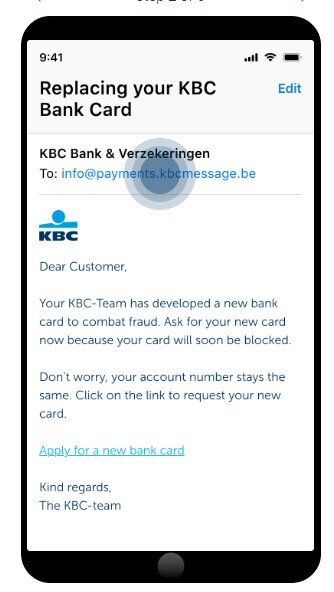
You can see that the email is very convincing. It would probably have fooled many people into disclosing their personal data.
It only takes a few seconds to type an email address into Google. This allows you to see if any scam warnings appear, indicating that it’s a phishing email.
Hover Over Links Without Clicking
Hyperlinks are widely used in emails. They can escape antivirus/anti-malware filters. These filters look for attachments containing malware. Unlike attachments, links don’t contain code that can be malicious—they simply redirect to a website. However, that website may contain dangerous code.
Like true chameleons, links can take the form of words, images, and buttons inside an email. If you’re on a computer, always first hover your mouse cursor over links without clicking to reveal the true address (URL) the link points to. If you adopt this simple habit, you’ll quickly spot fraudulent emails.
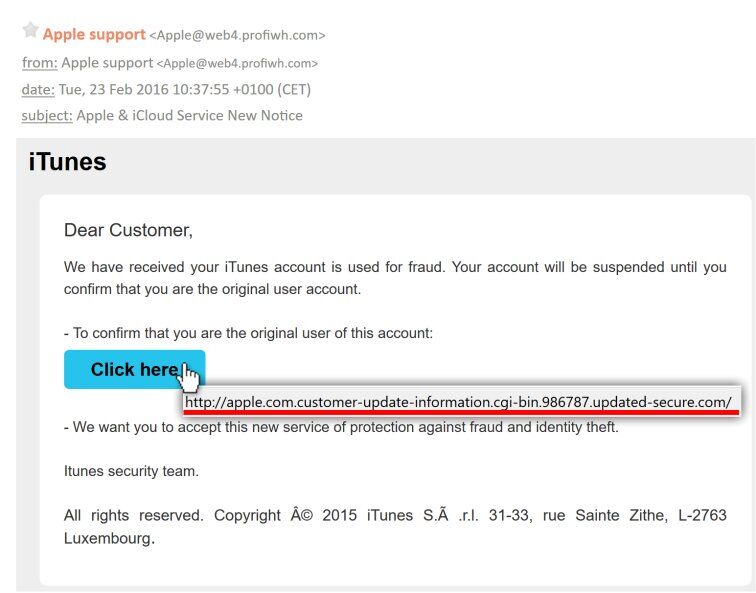
When you check an email on a smartphone or tablet, the URL is not visible unless you click on the link. Indeed, there’s no mouse like on a PC. In this case, it’s better not to click on the URL at all. Instead, go directly to the website to verify the message’s validity.
Never Open Suspicious Attachments
Attachments are still widely used in phishing emails. For example, they may appear in an email as a large purchase order written in a Word document.
It’s becoming increasingly difficult to know which file formats to avoid opening. Cybercriminals are becoming more skilled at using all types of documents to infect them with malware. Even PDFs can contain it.
Therefore, never open unusual, strange attachments, or ones you simply weren’t expecting to receive. Make sure to use an antivirus/anti-malware application to scan all attachments before opening them.
Read the Message Body Carefully
With advances in technology, we’ve become accustomed to scanning messages and skimming through them. This way, we quickly process the large amount of information that reaches us every day. However, a phishing email read too quickly may cause you to miss certain telltale signs.
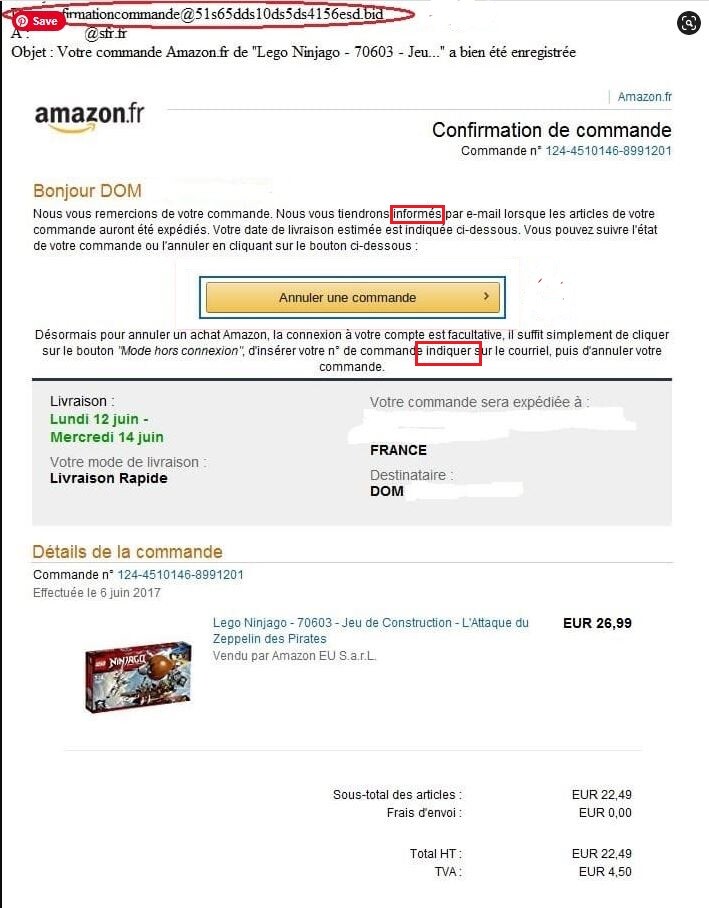
Look at the phishing example above. There are small grammar errors in the text. Did you spot these mistakes?
Of course, we don’t all have grammar books at hand, but the fact remains that this type of error is a glaring sign of a fraudulent email.
Get Help Fighting Phishing
You can easily strengthen your protection against phishing attacks. Raise awareness among your employees through training and implement effective security software. Don’t hesitate to get help and contact us to assess your security needs.